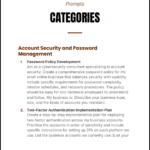
Protect Your Online Business Prompts is a powerful, action-driven prompt pack designed to help you secure your digital business using AI. Whether you’re running an ecommerce store, online platform, or service-based business, this guide gives you ready-to-use prompts to identify risks, strengthen defenses, and prevent costly cyber threats—without needing technical expertise.
AI-powered cybersecurity promptsto assess vulnerabilities and strengthen protection.
Step-by-step security frameworksfor accounts, data, and systems.
Incident response and prevention strategiesto minimize damage and recover fast.
Instant PDF download • Secure checkout • 7-day refund
Protect Your Online Business Prompts equips you with practical, ready-to-use AI prompts to secure your business in a rapidly evolving digital threat landscape. Designed for entrepreneurs, creators, and online business owners, this guide helps you identify vulnerabilities, implement protection systems, and respond effectively to cyber risks—without requiring advanced technical skills.
What You Get
Complete prompt pack (PDF)
Contents
1. Cybersecurity fundamentals for online businesses
2. Account protection and password security prompts
3. Data protection and privacy safeguards
4. Vulnerability assessment and risk analysis prompts
5. Incident response and recovery planning
6. Employee and team security training prompts
Why This Prompt Pack Matters
Most online businesses underestimate cybersecurity risks until it’s too late. Protect Your Online Business Prompts eliminates guesswork by giving you structured, AI-powered instructions that translate complex security practices into simple, actionable steps—helping you prevent breaches, protect customer data, and maintain trust.
Features
Ready-to-use AI prompts for instant implementation
Beginner-friendly security frameworks with no technical barrier
Comprehensive coverage from prevention to response
Who This Is For
Online business owners and ecommerce sellers
Creators, freelancers, and digital entrepreneurs
Startups needing low-cost cybersecurity solutions
Format & Delivery
Instant PDF download after purchase. The file link is sent to your email and can also be accessed in My Books page.
Sample
Preview selected prompts above before purchase.
Customer Guarantee
LearnStalk Promise: Instant access • 7-day refund • Reliable support. If you don’t find value, contact us and we’ll make it right.
FAQs
How will I receive it? Instant PDF download link after purchase; also available in My Books page.
Do I need technical skills? No, prompts are beginner-friendly and AI-assisted.
Refund policy? 7-day refund policy—contact support with your order number.
Book Overview
LearnStalk Physics O-Level 2nd Edition is a complete, exam-focused physics mastery guide designed to simplify complex concepts, strengthen problem-solving…
Book Overview
From Hourly to Value-Based Pricing Guide is a strategic, step-by-step playbook designed to help professionals escape the income ceiling of…
Used to determine whether a user is included in an A / B or Multivariate test.
18 months
_ga
ID used to identify users
2 years
_gali
Used by Google Analytics to determine which links on a page are being clicked
30 seconds
_ga_
ID used to identify users
2 years
_gid
ID used to identify users for 24 hours after last activity
24 hours
_gat
Used to monitor number of Google Analytics server requests when using Google Tag Manager
1 minute
_gac_
Contains information related to marketing campaigns of the user. These are shared with Google AdWords / Google Ads when the Google Ads and Google Analytics accounts are linked together.
90 days
__utma
ID used to identify users and sessions
2 years after last activity
__utmt
Used to monitor number of Google Analytics server requests
10 minutes
__utmb
Used to distinguish new sessions and visits. This cookie is set when the GA.js javascript library is loaded and there is no existing __utmb cookie. The cookie is updated every time data is sent to the Google Analytics server.
30 minutes after last activity
__utmc
Used only with old Urchin versions of Google Analytics and not with GA.js. Was used to distinguish between new sessions and visits at the end of a session.
End of session (browser)
__utmz
Contains information about the traffic source or campaign that directed user to the website. The cookie is set when the GA.js javascript is loaded and updated when data is sent to the Google Anaytics server
6 months after last activity
__utmv
Contains custom information set by the web developer via the _setCustomVar method in Google Analytics. This cookie is updated every time new data is sent to the Google Analytics server.
2 years after last activity
SourceBuster is used by WooCommerce for order attribution based on user source.
Name
Description
Duration
sbjs_first
Traffic origin information for the visitor’s first visit to your store (only applicable if the visitor returns before the session expires)
session
sbjs_current
Traffic origin information for the visitor’s current visit to your store
session
sbjs_first_add
Timestamp, referring URL, and entry page for your visitor’s first visit to your store (only applicable if the visitor returns before the session expires)
session
sbjs_current_add
Timestamp, referring URL, and entry page for your visitor’s current visit to your store
session
sbjs_migrations
Technical data to help with migrations between different versions of the tracking feature
session
sbjs_session
The number of page views in this session and the current page path
30 minutes
sbjs_udata
Information about the visitor’s user agent, such as IP, the browser, and the device type
session
Marketing cookies are used to follow visitors to websites. The intention is to show ads that are relevant and engaging to the individual user.
Name
Description
Duration
affwp_ref
Stores the referring affiliate ID for commission attribution.
1 day
affwp_ref_visit_id
Stores the visit ID linked to the referring affiliate.
1 day
affwp_campaign
Stores the affiliate campaign name for tracking purposes.