AI Teaching Assistant Prompts is a practical, time-saving toolkit designed to help teachers use AI to plan lessons faster, personalize learning, and reduce workload. With over 40 ready-to-use prompts, this guide transforms AI into your personal teaching assistant—so you can focus more on teaching and less on repetitive tasks.
40+ ready-to-use AI promptsto streamline lesson planning, grading, and communication.
Differentiation and engagement strategiesto support diverse learners effectively.
Workload reduction systemsthat save time and improve teaching quality.
Instant PDF download • Secure checkout • 7-day refund
14 people bought this product today
This item:AI Teaching Assistant Prompts
$7.00Original price was: $7.00.$5.60Current price is: $5.60.
$7.00
Frequently bought together to increase results. Buy 2+ and Save 15%
AI Teaching Assistant Prompts is a structured, practical guide designed to help educators integrate artificial intelligence into their daily workflow. With over 40 carefully crafted prompts, this resource enables teachers to automate repetitive tasks, improve lesson quality, and create more engaging and personalized learning experiences—without needing technical expertise.
What You Get
Complete prompt guide (PDF)
Contents
1. AI-powered lesson planning prompts
2. Differentiation and personalized learning prompts
3. Student engagement and activity creation prompts
4. Assessment and feedback automation prompts
5. Classroom communication and admin support prompts
6. Productivity and workflow optimization prompts
Why This Guide Matters
Teaching today involves far more than delivering lessons—it includes planning, grading, communication, and constant adaptation. AI Teaching Assistant Prompts helps reduce this burden by turning AI into a reliable support system. Instead of spending hours on repetitive tasks, you can generate high-quality outputs in minutes and focus more on student impact.
Features
Ready-to-use prompts for immediate application
Clear use-case structure for different teaching needs
Time-saving workflows for daily teaching tasks
Who This Guide Is For
Teachers looking to reduce workload and save time
Educators wanting to integrate AI into their teaching
Anyone aiming to improve lesson quality and engagement
Format & Delivery
Instant PDF download after purchase. The guide link sent to your email and can also be accessed in My Books page.
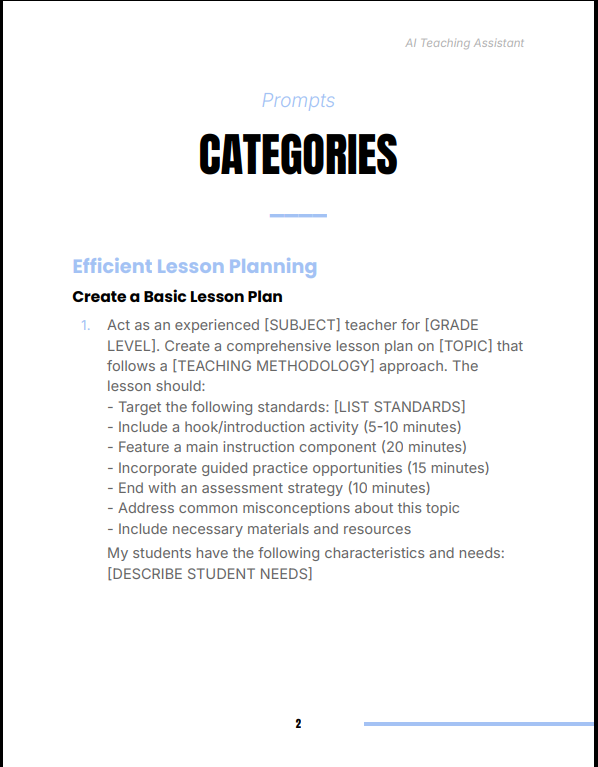
Sample
Preview selected prompts above before purchase.
Customer Guarantee
LearnStalk Promise: Instant PDF access • 7-day refund • Support via messaging. If you don’t see clear value, contact us and we’ll resolve it.
FAQs
How will I receive the guide? Instant PDF link after purchase; check spam if you don’t see the email. It can also be accessed in My Books page.
Do I need technical skills? No. Prompts are designed for easy copy-paste use with AI tools.
Refunds? 7-day refund policy, read refund and return policy below — contact support with order number.
Book Overview
The Scroll-Stopping Content System Guide is a practical, psychology-driven playbook that teaches you how to capture attention in seconds,…
Book Overview
The Neuroscience of Peak Productivity is a science-backed, performance-driven guide that reveals how to consistently access the flow state,…
Used to determine whether a user is included in an A / B or Multivariate test.
18 months
_ga
ID used to identify users
2 years
_gali
Used by Google Analytics to determine which links on a page are being clicked
30 seconds
_ga_
ID used to identify users
2 years
_gid
ID used to identify users for 24 hours after last activity
24 hours
_gat
Used to monitor number of Google Analytics server requests when using Google Tag Manager
1 minute
_gac_
Contains information related to marketing campaigns of the user. These are shared with Google AdWords / Google Ads when the Google Ads and Google Analytics accounts are linked together.
90 days
__utma
ID used to identify users and sessions
2 years after last activity
__utmt
Used to monitor number of Google Analytics server requests
10 minutes
__utmb
Used to distinguish new sessions and visits. This cookie is set when the GA.js javascript library is loaded and there is no existing __utmb cookie. The cookie is updated every time data is sent to the Google Analytics server.
30 minutes after last activity
__utmc
Used only with old Urchin versions of Google Analytics and not with GA.js. Was used to distinguish between new sessions and visits at the end of a session.
End of session (browser)
__utmz
Contains information about the traffic source or campaign that directed user to the website. The cookie is set when the GA.js javascript is loaded and updated when data is sent to the Google Anaytics server
6 months after last activity
__utmv
Contains custom information set by the web developer via the _setCustomVar method in Google Analytics. This cookie is updated every time new data is sent to the Google Analytics server.
2 years after last activity
SourceBuster is used by WooCommerce for order attribution based on user source.
Name
Description
Duration
sbjs_first
Traffic origin information for the visitor’s first visit to your store (only applicable if the visitor returns before the session expires)
session
sbjs_current
Traffic origin information for the visitor’s current visit to your store
session
sbjs_first_add
Timestamp, referring URL, and entry page for your visitor’s first visit to your store (only applicable if the visitor returns before the session expires)
session
sbjs_current_add
Timestamp, referring URL, and entry page for your visitor’s current visit to your store
session
sbjs_migrations
Technical data to help with migrations between different versions of the tracking feature
session
sbjs_session
The number of page views in this session and the current page path
30 minutes
sbjs_udata
Information about the visitor’s user agent, such as IP, the browser, and the device type