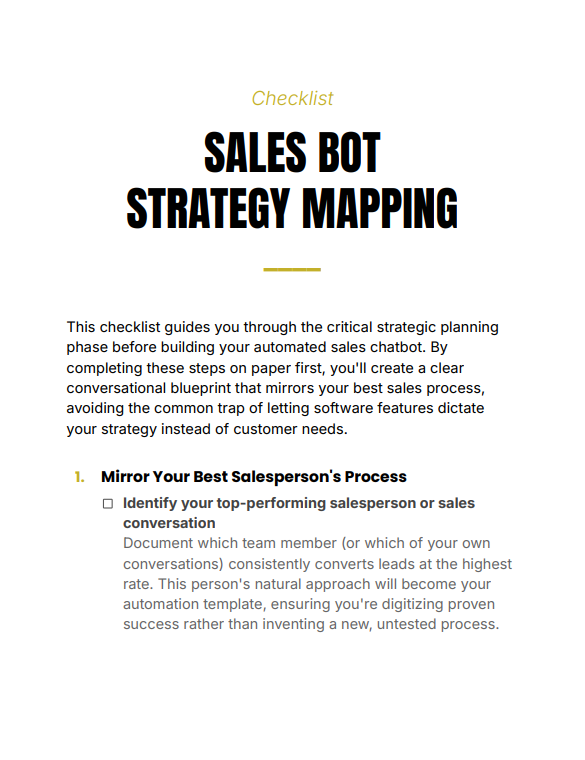
Sales Bot Strategy Mapping Checklist is a practical, pre-build planning tool that helps you design a high-converting chatbot by mapping your sales process before touching any software. It ensures your automation follows customer psychology, not platform limitations—so your bot sells like your best salesperson.
Sales Bot Strategy Mapping Checklist gives you a structured system to design your chatbot strategy before building anything. Instead of jumping into tools and guessing flows, this checklist walks you through defining your customer journey, sales triggers, objections, and conversion pathways—so your chatbot operates with clarity and purpose.
What You Get
Complete checklist (PDF)
Contents
1. Defining your chatbot objective and conversion goal
2. Mapping your ideal customer journey
3. Identifying key questions and decision triggers
4. Structuring conversation flow and logic paths
5. Handling objections and drop-off points
6. Designing call-to-action pathways
7. Pre-build validation and optimization checklist
Why This Checklist Matters
Most chatbots fail because they are built around features instead of strategy. Sales Bot Strategy Mapping Checklist forces clarity before execution—helping you think through customer intent, messaging, and flow logic. This reduces friction, improves conversions, and saves time by eliminating trial-and-error builds.
Features
Structured planning framework for chatbot sales systems
Customer journey mapping prompts for better engagement
Conversion-focused flow design with actionable checkpoints
Who This Checklist Is For
Entrepreneurs building automated sales systems
Marketers designing chatbot funnels
Businesses looking to improve lead conversion
Format & Delivery
Instant PDF download after purchase. The checklist link is sent to your email and can also be accessed in My Books page.
Sample
Preview a sample section above to see how the checklist is structured.
Customer Guarantee
LearnStalk Promise: Instant PDF access • 7-day refund • Support via messaging. If you don’t see clear value, contact us and we’ll resolve it.
FAQs
How will I receive the checklist? Instant PDF link after purchase; check spam if you don’t see the email. It can also be accessed in My Books page.
What formats? PDF (standard).
Refunds? 7-day refund policy, read refund and return policy below — contact support with order number.
Used to determine whether a user is included in an A / B or Multivariate test.
18 months
_ga
ID used to identify users
2 years
_gali
Used by Google Analytics to determine which links on a page are being clicked
30 seconds
_ga_
ID used to identify users
2 years
_gid
ID used to identify users for 24 hours after last activity
24 hours
_gat
Used to monitor number of Google Analytics server requests when using Google Tag Manager
1 minute
_gac_
Contains information related to marketing campaigns of the user. These are shared with Google AdWords / Google Ads when the Google Ads and Google Analytics accounts are linked together.
90 days
__utma
ID used to identify users and sessions
2 years after last activity
__utmt
Used to monitor number of Google Analytics server requests
10 minutes
__utmb
Used to distinguish new sessions and visits. This cookie is set when the GA.js javascript library is loaded and there is no existing __utmb cookie. The cookie is updated every time data is sent to the Google Analytics server.
30 minutes after last activity
__utmc
Used only with old Urchin versions of Google Analytics and not with GA.js. Was used to distinguish between new sessions and visits at the end of a session.
End of session (browser)
__utmz
Contains information about the traffic source or campaign that directed user to the website. The cookie is set when the GA.js javascript is loaded and updated when data is sent to the Google Anaytics server
6 months after last activity
__utmv
Contains custom information set by the web developer via the _setCustomVar method in Google Analytics. This cookie is updated every time new data is sent to the Google Analytics server.
2 years after last activity
SourceBuster is used by WooCommerce for order attribution based on user source.
Name
Description
Duration
sbjs_first
Traffic origin information for the visitor’s first visit to your store (only applicable if the visitor returns before the session expires)
session
sbjs_current
Traffic origin information for the visitor’s current visit to your store
session
sbjs_first_add
Timestamp, referring URL, and entry page for your visitor’s first visit to your store (only applicable if the visitor returns before the session expires)
session
sbjs_current_add
Timestamp, referring URL, and entry page for your visitor’s current visit to your store
session
sbjs_migrations
Technical data to help with migrations between different versions of the tracking feature
session
sbjs_session
The number of page views in this session and the current page path
30 minutes
sbjs_udata
Information about the visitor’s user agent, such as IP, the browser, and the device type