

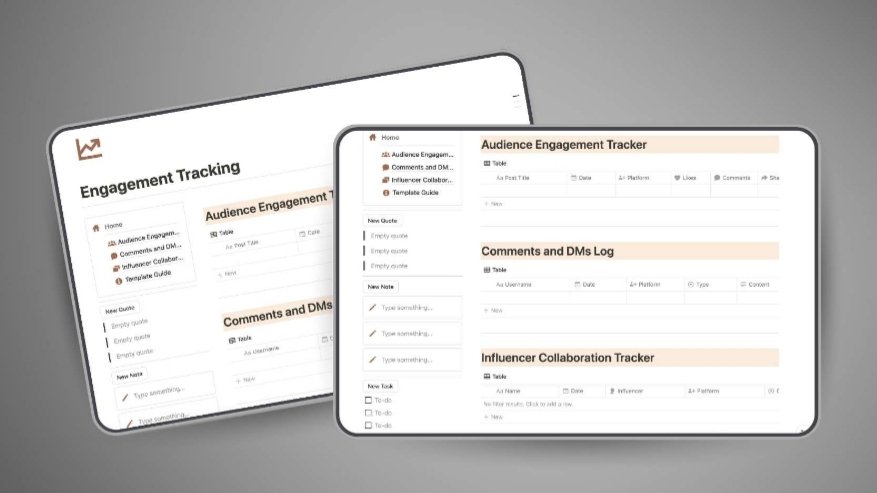


Audience Growth & Engagement Tracker is a powerful Notion template designed to help you systematically track audience interactions, measure engagement performance, and refine your growth strategy using clear, data-driven insights. Ideal for creators, entrepreneurs, and businesses aiming to scale audience impact efficiently.
Centralized engagement tracking systemto monitor all audience interactions in one place.
Performance measurement toolsto evaluate what content and strategies work best.
Data-driven optimization frameworkto improve engagement and audience growth.
Audience Growth & Engagement Tracker is a structured Notion system that helps you move beyond guesswork and manage your audience growth with precision. It enables you to track interactions, analyze engagement patterns, and optimize your strategy using organized data — all in one streamlined workspace.
What You Get
Fully structured Notion template
Contents
1. Engagement tracking dashboard
2. Audience interaction logs
3. Performance metrics tracking system
4. Strategy optimization section
5. Insights and trend analysis workspace
Why This Template Matters
Most creators and businesses struggle with inconsistent growth because they lack visibility into what actually drives engagement. Audience Growth & Engagement Tracker solves this by providing a clear system to track, analyze, and refine your efforts — turning scattered interactions into actionable insights that compound over time.
Features
Clean and organized layout for easy tracking
Performance monitoring tools for better decision-making
Strategy optimization sections to refine engagement approaches
All-in-one dashboard to simplify audience management
Used to determine whether a user is included in an A / B or Multivariate test.
18 months
_ga
ID used to identify users
2 years
_gali
Used by Google Analytics to determine which links on a page are being clicked
30 seconds
_ga_
ID used to identify users
2 years
_gid
ID used to identify users for 24 hours after last activity
24 hours
_gat
Used to monitor number of Google Analytics server requests when using Google Tag Manager
1 minute
_gac_
Contains information related to marketing campaigns of the user. These are shared with Google AdWords / Google Ads when the Google Ads and Google Analytics accounts are linked together.
90 days
__utma
ID used to identify users and sessions
2 years after last activity
__utmt
Used to monitor number of Google Analytics server requests
10 minutes
__utmb
Used to distinguish new sessions and visits. This cookie is set when the GA.js javascript library is loaded and there is no existing __utmb cookie. The cookie is updated every time data is sent to the Google Analytics server.
30 minutes after last activity
__utmc
Used only with old Urchin versions of Google Analytics and not with GA.js. Was used to distinguish between new sessions and visits at the end of a session.
End of session (browser)
__utmz
Contains information about the traffic source or campaign that directed user to the website. The cookie is set when the GA.js javascript is loaded and updated when data is sent to the Google Anaytics server
6 months after last activity
__utmv
Contains custom information set by the web developer via the _setCustomVar method in Google Analytics. This cookie is updated every time new data is sent to the Google Analytics server.
2 years after last activity
SourceBuster is used by WooCommerce for order attribution based on user source.
Name
Description
Duration
sbjs_session
The number of page views in this session and the current page path
30 minutes
sbjs_udata
Information about the visitor’s user agent, such as IP, the browser, and the device type
session
sbjs_first
Traffic origin information for the visitor’s first visit to your store (only applicable if the visitor returns before the session expires)
session
sbjs_current
Traffic origin information for the visitor’s current visit to your store
session
sbjs_first_add
Timestamp, referring URL, and entry page for your visitor’s first visit to your store (only applicable if the visitor returns before the session expires)
session
sbjs_current_add
Timestamp, referring URL, and entry page for your visitor’s current visit to your store
session
sbjs_migrations
Technical data to help with migrations between different versions of the tracking feature