Post-Phishing Incident Response Checklist is a fast-action, step-by-step guide designed to help you respond immediately after a phishing attack. It walks you through the critical first 30 minutes—containing the threat, securing compromised accounts, and preventing further damage. Ideal for individuals, students, and professionals who need a clear, calm, and structured response plan.
Post-Phishing Incident Response Checklist provides a structured, no-panic response system for handling phishing incidents. Instead of reacting emotionally, this checklist guides you through precise, time-sensitive actions to contain threats, secure accounts, and document the breach effectively. Designed for clarity and speed, it ensures you don’t miss critical steps when every minute matters.
What You Get
Printable checklist (PDF)
Contents
1. Immediate threat identification and confirmation
2. First 30-minute containment actions
3. Password resets and account lockdown procedures
4. Email, banking, and social account recovery steps
5. Device security checks and malware scans
6. Incident documentation and reporting guidelines
7. Post-incident prevention measures
Why This Checklist Matters
During a phishing attack, hesitation and confusion increase damage. Post-Phishing Incident Response Checklist eliminates guesswork by providing a clear execution path—helping you act quickly, reduce exposure, and regain control before the situation escalates.
Features
Time-critical action flow for immediate response
Simple, structured checklist format for zero confusion
Covers full response cycle from detection to prevention
Who This Is For
Anyone who suspects or confirms a phishing attack
Students and professionals handling sensitive accounts
Individuals who want a ready-to-use cyber incident response plan
Format & Delivery
Instant PDF download after purchase. The checklist link is sent to your email and can also be accessed in My Books page.
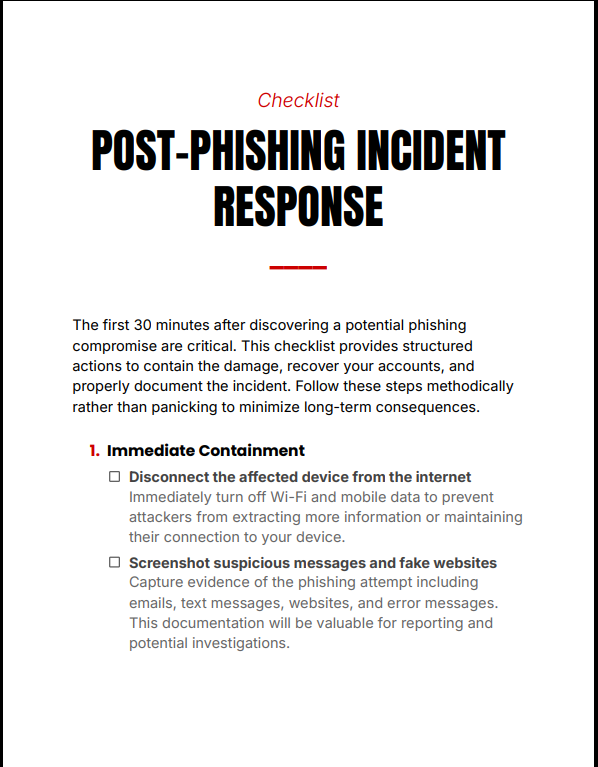
Sample
Preview a section of the checklist above.
Customer Guarantee
LearnStalk Promise: Instant PDF access • 7-day refund • Support via messaging. If you don’t find it useful when you need it most, contact us and we’ll resolve it.
FAQs
How will I receive the checklist? Instant PDF link after purchase; check spam if you don’t see the email. Also available in My Books page.
What format is included? PDF (printable and digital use).
Refund policy? 7-day refund policy—see refund terms below and contact support with your order number.
Book Overview
LearnStalk Physics O-Level 2nd Edition is a complete, exam-focused physics mastery guide designed to simplify complex concepts, strengthen problem-solving…
Checklist Overview
Build Positive Digital Presence Checklist is a practical, step-by-step execution tool designed to help you implement proven strategies for…
Used to determine whether a user is included in an A / B or Multivariate test.
18 months
_ga
ID used to identify users
2 years
_gali
Used by Google Analytics to determine which links on a page are being clicked
30 seconds
_ga_
ID used to identify users
2 years
_gid
ID used to identify users for 24 hours after last activity
24 hours
_gat
Used to monitor number of Google Analytics server requests when using Google Tag Manager
1 minute
_gac_
Contains information related to marketing campaigns of the user. These are shared with Google AdWords / Google Ads when the Google Ads and Google Analytics accounts are linked together.
90 days
__utma
ID used to identify users and sessions
2 years after last activity
__utmt
Used to monitor number of Google Analytics server requests
10 minutes
__utmb
Used to distinguish new sessions and visits. This cookie is set when the GA.js javascript library is loaded and there is no existing __utmb cookie. The cookie is updated every time data is sent to the Google Analytics server.
30 minutes after last activity
__utmc
Used only with old Urchin versions of Google Analytics and not with GA.js. Was used to distinguish between new sessions and visits at the end of a session.
End of session (browser)
__utmz
Contains information about the traffic source or campaign that directed user to the website. The cookie is set when the GA.js javascript is loaded and updated when data is sent to the Google Anaytics server
6 months after last activity
__utmv
Contains custom information set by the web developer via the _setCustomVar method in Google Analytics. This cookie is updated every time new data is sent to the Google Analytics server.
2 years after last activity
SourceBuster is used by WooCommerce for order attribution based on user source.
Name
Description
Duration
sbjs_first
Traffic origin information for the visitor’s first visit to your store (only applicable if the visitor returns before the session expires)
session
sbjs_current
Traffic origin information for the visitor’s current visit to your store
session
sbjs_first_add
Timestamp, referring URL, and entry page for your visitor’s first visit to your store (only applicable if the visitor returns before the session expires)
session
sbjs_current_add
Timestamp, referring URL, and entry page for your visitor’s current visit to your store
session
sbjs_migrations
Technical data to help with migrations between different versions of the tracking feature
session
sbjs_session
The number of page views in this session and the current page path
30 minutes
sbjs_udata
Information about the visitor’s user agent, such as IP, the browser, and the device type
session
Marketing cookies are used to follow visitors to websites. The intention is to show ads that are relevant and engaging to the individual user.
Name
Description
Duration
affwp_ref
Stores the referring affiliate ID for commission attribution.
1 day
affwp_ref_visit_id
Stores the visit ID linked to the referring affiliate.
1 day
affwp_campaign
Stores the affiliate campaign name for tracking purposes.